

By Dustin Sosko
Published: October 21, 2026
Last updated: October 29, 2026
Quick answer: Our shortlist covers three needs: the EPOMAKER TH99 with Sea Salt Silent switches for writers who want a numpad, the Ducky One 3 SF with Cherry MX Silent Red switches for a compact wired setup, and the Logitech MX Mechanical Tactile Quiet for a low-profile wireless alternative.
Affiliate disclosure: As an Amazon Associate, QuietTechReport earns from qualifying purchases. Some links below are affiliate links.
If you also spend time in video meetings, our quiet keyboards with a microphone mute key for Microsoft Teams guide explains dedicated controls, software requirements and mute testing.
Taking your writing setup to a library? Our quiet keyboards for library study guide compares compact alternatives, bag weight and practical checks for shared study spaces.
Still choosing between mechanical and low-profile alternatives? Visit our Quiet Keyboards hub for switch comparisons and guides for writing, office work, gaming and study.
Quick comparison
| Keyboard and exact switch | Best fit | Connection | Main tradeoff | Check availability |
|---|---|---|---|---|
| EPOMAKER TH99 — Sea Salt Silent | Silent linear switches with a numpad | Wired USB, Bluetooth, or 2.4 GHz | Compact navigation arrangement | View on Amazon |
| Ducky One 3 SF — Cherry MX Silent Red | Compact, wired writing setup | Wired USB | No numpad or dedicated function row | View on Amazon |
| Logitech MX Mechanical — Tactile Quiet | Low-profile wireless typing | Bluetooth or Logi Bolt receiver | Quiet tactile switches are not silent switches | View on Amazon |
The TH99 link is an untagged product link. The Ducky and Logitech links are affiliate links. Prices, sellers, availability, and selected options can change.
What makes a mechanical keyboard quiet?
Start with the switch. A silent mechanical switch is designed to reduce the impact sounds produced during a keystroke. For example, CHERRY describes integrated damping in its Silent Red switch design. An ordinary red switch should not be treated as equivalent simply because it is linear.
The complete keyboard still matters. Large keys, stabilizers, the case, your typing force, and the desk underneath can affect what you hear. “Silent” does not mean soundless, and switch names alone do not establish a measured noise ranking.

EPOMAKER TH99 Sea Salt Silent: for writers who want a numpad
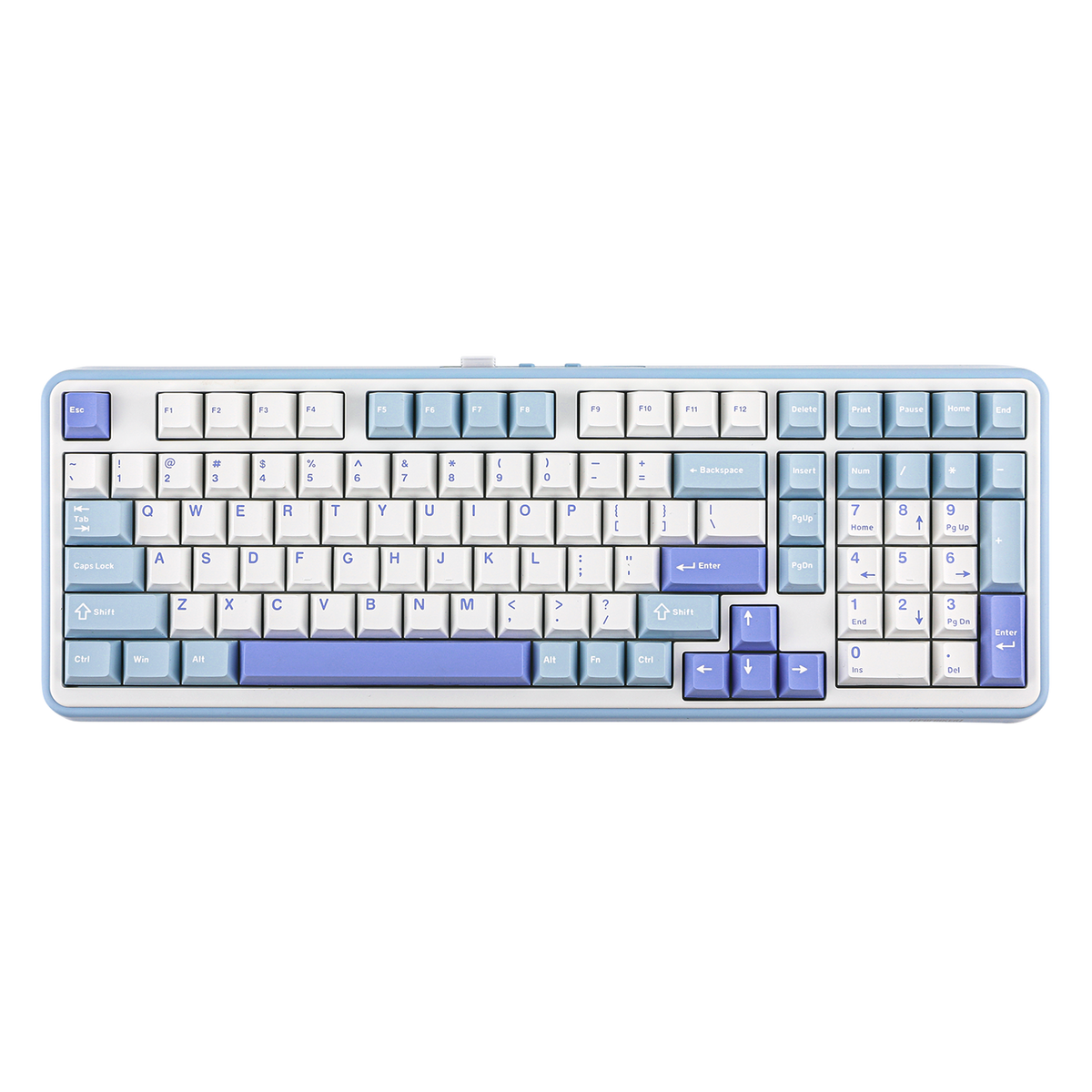
The TH99 is worth considering if your writing work includes budgets, invoices, research tables, or frequent number entry.
The Sea Salt Silent version combines linear switches with a compact numpad layout. EPOMAKER documents wired USB, Bluetooth, and 2.4 GHz connectivity, plus hot-swappable switches. Its manufacturer product page distinguishes Sea Salt Silent from Creamy Jade; the Amazon listing selects Blue&White / Sea Salt Silent.
The compromise is the compressed layout. Check the navigation-key positions against your existing keyboard before switching.
Choose this exact version: TH99, Sea Salt Silent. The verified Amazon listing was Blue&White. TH99 Pro and Creamy Jade are different selections.
Ducky One 3 SF Cherry MX Silent Red: for a compact wired desk

The One 3 SF is the compact option for writers who want silent linear switches and a cable connection.
Ducky’s One 3 documentation confirms the 65% format, wired connection, detachable USB-C cable, hot-swap sockets, and Cherry Silent Red option. The verified listing pairs that format with Cherry MX Silent Red switches.
It keeps dedicated arrow keys while removing the numpad and separate function row. That can suit a small writing desk, provided you are comfortable using layers for additional functions.
Before buying, review the official SF manual and check its navigation arrangement.
Choose this exact version: One 3 SF, Cherry MX Silent Red. Ordinary Red is a different switch.
Logitech MX Mechanical Tactile Quiet: for low-profile wireless typing
The MX Mechanical is the alternative for writers who prefer lower keys and wireless device switching.
Logitech documents low-profile mechanical keys, a full-size layout, and connections to up to three devices. The verified configuration uses Tactile Quiet switches.
Treat this as a typing-feel and convenience choice. It has a tactile bump and should not be presented as a silent linear keyboard or the quietest model here.
Choose this exact version: Full-size MX Mechanical, Graphite, Tactile — quiet typing. Clicky, Linear, and MX Mechanical Mini are different selections.
Choose the layout around your editing habits
Think about how you revise a document before deciding how small your keyboard should be. A layout that feels convenient while drafting can become frustrating when selecting paragraphs, navigating research, or correcting a long manuscript.

- Keep a traditional full-size layout if you use its separated key groups. Familiar navigation positions may matter more to you than saving desk space.
- Consider a compact numpad layout if number entry is part of your work. Check which editing keys have moved or share secondary functions.
- Choose 65% if you want a smaller board and accept layers. Dedicated arrows help, but examine access to Home, End, Page Up, Page Down, and function keys.
Keyboard shortcuts also depend on your operating system and writing app. Check the combinations you actually use rather than assuming every layout behaves like your current one.
Try this writing and editing check

Before you buy

- Confirm the switch in the selected option. A familiar product photograph does not guarantee the quiet configuration.
- Check the keyboard language and layout. Compare the listing images with the keys you need.
- Match the connection to your computer. Check available ports and whether you intend to use Bluetooth, a receiver, or wired USB.
- Compare the delivered total. Include shipping, taxes, and any accessories you actually need.
- Read the seller’s return conditions. Typing feel and acceptable noise are personal, so understand your options before ordering.
For a broader range of office options, see our guide to quiet keyboards for office work.
Frequently asked questions
Are mechanical keyboards good for writing?
They can be, if you like their feel and layout. Mechanical switches do not automatically improve writing speed, accuracy, or comfort. Choose around your preferences and editing habits.
Are brown switches silent?
Do not assume so. Look for an explicit silent-switch designation and confirm the exact model. A tactile bump and noise damping are different characteristics.
Should writers choose linear or tactile switches?
Choose linear if you prefer a smooth press without a tactile bump. Choose tactile if you enjoy feedback during the press. Neither preference makes someone a better writer; the useful question is which feels comfortable during your normal work.
Can a desk mat make a keyboard silent?
Treat a mat as an adjustment to your desk setup. It cannot replace a clicky switch mechanism or guarantee that the large keys will sound quiet. Start by choosing the right keyboard configuration.
How we researched this guide
We checked the linked manufacturer pages and the three exact Amazon destinations on October 29, 2026. These are documented switch and layout distinctions, not a measured quietest-to-loudest ranking. We have not performed matched acoustic or hands-on writing tests.
TH99 discrepancy: Amazon’s title and bullets advertise 8000mAh, while EPOMAKER’s page and parts of Amazon’s description state 4000mAh. The capacity of the linked unit remains unresolved; confirm it with the seller if battery capacity affects your choice. We do not use that conflicting figure to recommend this model.
Which one should you choose?
Choose the TH99 Sea Salt Silent if a numpad and silent linear switches are your priorities. Check the compact editing layout first.
Choose the Ducky One 3 SF Silent Red if you want a compact wired board and are comfortable with layers.
Choose the MX Mechanical Tactile Quiet if low-profile keys and wireless convenience matter most.
For a shared room or late-night writing, begin with the explicitly silent-switch options, then assess the complete keyboard in your own workspace.
Found a changed listing or specification? Contact us with the model and source link. See our Editorial & Corrections Policy.